
What Is Image SEO & Why It Matters
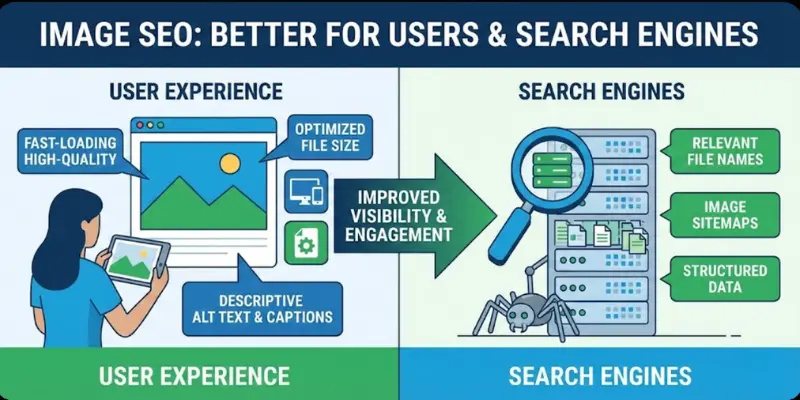
Image SEO is the practice of optimizing images so they load faster, rank in Google Images, and improve overall user experience. While most websites focus heavily on text, visuals play a critical role in organic traffic, engagement, and accessibility.
Well-optimized images help your content appear in Google Images, featured snippets, knowledge panels, and visual search tools like Google Lens and Pinterest. When done correctly, image optimization turns visuals from decoration into measurable traffic assets.
In simple terms, image SEO means choosing the right file format, writing descriptive alt text, compressing images for speed, and helping search engines understand visual context through technical signals.
Where Images Appear in Search Results
Optimized images can appear across multiple Google surfaces, not just image search.
- Google Images – The largest visual search engine
- Featured Snippets – Image-enhanced answers at the top of SERPs
- Knowledge Panels – Brand, place, and entity visuals
- Rich Results – Images enhanced through structured data
- Visual Search Platforms – Google Lens, Bing Visual Search, Pinterest Lens
Strong image SEO increases visibility across all of these placements.
Why Image SEO Matters for User Experience
Images play a major role in how users perceive and interact with a website. Fast-loading, well-optimized visuals reduce bounce rates and keep users engaged longer. When images load slowly or appear distorted, users often leave the page, which negatively impacts SEO performance.
Optimized images also improve accessibility for visually impaired users through proper alt text. This makes your website more inclusive while sending positive quality signals to search engines. A better user experience ultimately leads to higher engagement, longer session durations, and improved rankings.
Image SEO for Mobile-First Indexing
Google typically indexes and ranks material based on its mobile form. This makes image optimization even more important for mobile devices. Large or uncompressed images can significantly slow down mobile page speed.
By using responsive images, proper compression, and modern formats, you ensure that mobile users receive fast and visually appealing content. Mobile-friendly images help meet Core Web Vitals benchmarks, which directly influence search visibility.
Strong image SEO increases visibility across all of these placements.
Image SEO Optimization Guide (Step-by-Step)
1. Use High-Quality, Relevant Images
Image quality directly impacts engagement and trust. Original photos, custom graphics, and branded visuals perform better than generic stock images.
For industries like NGOs, healthcare, and real estate, authentic images increase credibility and click-through rates. Avoid blurry, stretched, or irrelevant visuals.
2. Choose the Right Image File Format
Selecting the correct file format balances image quality and page speed.
| Format | Best For | Advantages | Limitations |
| JPEG | Photos | Small file size | Lossy compression |
| PNG | Graphics | Transparency support | Larger files |
| WebP | Most images | High quality, smaller size | Limited old browser support |
| AVIF | High-end visuals | Best compression | Limited compatibility |
Best practice: Use WebP where possible and JPEG for standard photos.
3. Name Images Descriptively
File names help search engines understand image content and context even before the page is fully rendered. A clear, descriptive file name improves image relevance and supports better rankings in Google Images.
IMG_4589.jpg
london-healthcare-clinic.jpg
Use lowercase letters, hyphens between words, and natural descriptions that reflect what the image actually shows. Include keywords only when they genuinely describe the image, as misleading file names can hurt user trust and SEO signals.
4. Write Clear, Helpful Alt Text
Alt text improves accessibility for screen readers and helps search engines understand what an image represents. It becomes especially important when images fail to load or are used in assistive technologies.
Best practices:
- Describe the image naturally and accurately
- Keep it under 125 characters
- Include keywords only when they add context
- Avoid phrases like “image of” or “picture of”
Example:
“Modern healthcare clinic in London offering free check-ups”
Well-written alt text improves compliance, usability, and image search visibility at the same time.
5. Resize Images for Web Performance
Always upload images at the exact size they are displayed on your website. Oversized images increase page weight and slow down load times, especially on mobile devices.
- Avoid uploading unnecessarily large images
- Keep most images under 200 KB
- Match image width to layout and design requirements
Proper resizing improves page speed, reduces bandwidth usage, and contributes positively to Core Web Vitals.
6. Compress Images Without Losing Quality
Compression reduces file size while preserving visual clarity, making pages faster without sacrificing user experience. This step is essential for both desktop and mobile optimization.
Recommended tools:
- TinyPNG
- ShortPixel
- ImageOptim
Use lossless compression for important visuals like hero images and lossy compression for decorative or background graphics. Consistent compression leads to faster load times and better engagement metrics.
7. Use Responsive Images
Responsive images ensure the correct image size loads on each device, whether desktop, tablet, or mobile. This prevents unnecessary data usage and improves perceived speed.
Using srcset and sizes attributes allows browsers to select the most appropriate image version. This directly improves Core Web Vitals, lowers bounce rates, and enhances overall user experience.
8. Add Captions Where Helpful
Captions provide additional context that helps users better understand the image and its relevance to the content. They are often one of the most-read parts of a page.
Captions should:
- Be short and natural
- Add value beyond the image itself
- Match your brand tone and messaging
Use captions selectively, only when they enhance clarity or storytelling, rather than under every image.
9. Enable Lazy Loading
Lazy loading delays image loading until images are about to enter the user’s viewport. This significantly reduces initial page load time and improves performance metrics.
Lazy loading:
- Speeds up initial page load
- Improves First Contentful Paint (FCP)
- Enhances mobile performance
Use the native HTML attribute: loading=”lazy” to implement it efficiently without extra scripts.
10. Create an Image Sitemap
Image sitemaps help search engines discover visuals that may not be easily found through internal links alone. This ensures important images are properly indexed.
You can:
- Add image data to your main XML sitemap, or
- Create a dedicated image sitemap
Submitting the sitemap through Google Search Console helps speed up discovery and improves visibility in image search results.
11. Add Structured Data for Images
Schema markup provides search engines with detailed information about your images, helping them understand context and relevance more accurately.
Use ImageObject schema to define:
- Image URL
- Caption
- License
- Subject relevance
Structured data increases eligibility for rich results, image carousels, and enhanced SERP features.
12. Optimize Images for Social Sharing
Open Graph (OG) tags control how images appear when pages are shared on social media platforms. Well-optimized social images increase click-through rates and engagement.
Best practices:
- Recommended size: 1200 × 630 px
- Use high-quality, well-cropped visuals
- Keep file size optimized for fast loading
Social visibility can indirectly support SEO by driving additional traffic and brand awareness.
13. Serve Images Through a CDN
A Content Delivery Network (CDN) delivers images from servers closest to the user’s location. This reduces latency and improves global performance.
Benefits include:
- Faster load times
- Better Core Web Vitals scores
- Improved experience for international visitors
Many CDNs also provide automatic format conversion and real-time image optimization.
14. Enable Browser Caching
Browser caching allows images to be stored locally on a user’s device, reducing load times for repeat visits. This creates a smoother browsing experience.
Set static image caching for 30 days or more through your server or CDN to minimize repeat downloads and improve performance consistency.
15. Monitor Trends & Update Regularly
Image SEO evolves with new file formats, accessibility standards, and search engine updates. Staying updated ensures long-term visibility and performance.
Track performance using:
- Google Search Console
- PageSpeed Insights
- SEO audit tools
Regular monitoring and small adjustments can lead to significant long-term SEO improvements.
Image SEO for E-Commerce Websites
For e-commerce websites, images directly influence conversions as well as search visibility. Product images that are clear, fast-loading, and well-optimized help users make purchase decisions quickly.
Optimizing product image file names, alt text, and formats allows products to appear in Google Images and visual search results. Using multiple angles, zoom-friendly images, and consistent sizing also improves user trust and reduces return rates.
Common Image SEO Mistakes to Avoid
Many websites lose rankings due to simple image-related mistakes. Uploading large images, skipping alt text, or using generic file names can silently hurt SEO performance.
Avoid keyword stuffing in alt text, relying only on stock images, or ignoring mobile image optimization. Fixing these issues can lead to noticeable improvements in page speed, accessibility, and image search visibility.
How Image SEO Supports Core Web Vitals
Image optimization plays a major role in Core Web Vitals such as Largest Contentful Paint (LCP) and Cumulative Layout Shift (CLS). Poorly optimized images often cause layout shifts and slow page rendering.
By resizing images correctly, using next-gen formats, and reserving proper image dimensions, you create a more stable and faster experience. This helps meet Google’s performance benchmarks and improves rankings.
Image SEO Checklist Before Publishing
Before publishing any page, reviewing image SEO essentials ensures consistent performance. A simple checklist can prevent common issues and save time during audits.
Confirm that images are compressed, correctly sized, named descriptively, include alt text, and use modern formats where possible. Following this checklist helps maintain long-term SEO health.
How to Audit Image SEO Issues
Regular image SEO audits help maintain strong performance and prevent ranking drops. Over time, unoptimized images can silently impact site speed and accessibility.
Common issues include:
- Missing alt text
- Broken image URLs
- Oversized images
- Unsupported or outdated formats
Tools like Screaming Frog, Sitebulb, and Google Search Console can quickly identify and help resolve these problems.
Conclusion
Image SEO is a critical part of modern search optimization. By using descriptive file names, choosing efficient formats, compressing images, and implementing structured data, you improve visibility, speed, and user experience.
Whether you manage a blog, NGO site, healthcare platform, or real estate business, consistent image optimization can drive measurable organic growth. Start by optimizing your most important images and build from there.
FAQs
What is image SEO?
Image SEO is the process of optimizing images for search visibility, accessibility, and performance.
What is the best image size for web?
Ideally under 200 KB and sized to match display dimensions.
Which image format is best for SEO?
WebP for most use cases, JPEG for photos, PNG for transparency.
Does alt text affect rankings?
Yes. Alt text improves accessibility and helps search engines understand image content.
Do images improve SEO?
Yes. Optimized images improve page speed, engagement, and search visibility.