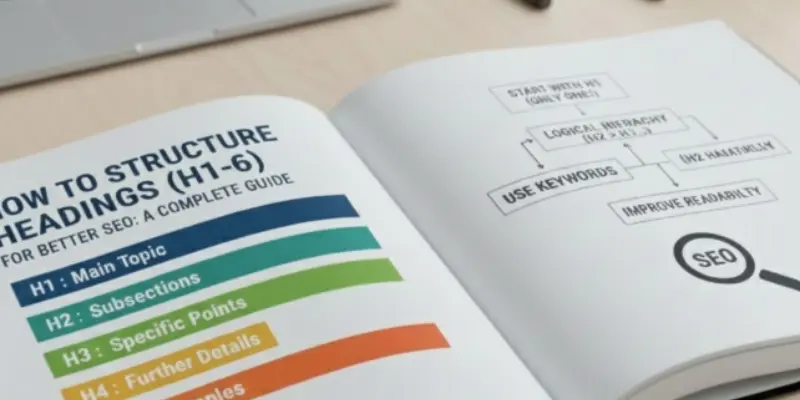
In today’s competitive online space, optimizing your content isn’t just about keywords—it’s also about how your content is structured. One of the most overlooked yet powerful on-page SEO techniques is using a clear and logical heading structure. From H1 to H6, each heading tag plays a vital role in improving readability, user experience, accessibility, and search engine visibility.
If your content isn’t ranking well or feels difficult to read, the issue may lie in improper heading usage. A well-structured heading hierarchy helps search engines understand your content and allows users to scan information easily. Whether you’re a blogger, digital marketer, or web designer, mastering heading structure can significantly improve your page structure for SEO. This guide explains best practices, tag-wise usage, and accessibility tips—while keeping your original content intent and flow intact.
Why Headings Matter in SEO
1. Headings Help Search Engines Understand Your Content
Headings act as the framework of your content. They organize information and clearly signal topic relevance to search engines. A proper heading structure helps crawlers identify what your page is about and how ideas are connected. This improves indexing, relevance, and overall on-page SEO performance.
2. Proper Heading Hierarchy Improves Readability
Headings guide readers through your content step by step. Each level adds context and detail, making large sections easier to digest. When headings follow a logical order, content becomes more scannable and engaging, which positively affects time on page and user experience.
3. Headings Define Website Content Hierarchy
Search engines rely on headings to understand your website’s content hierarchy. Clean structure helps identify main topics and subtopics efficiently. Ignoring this hierarchy can lead to poor indexing and weaker content comprehension. Semantic HTML structure supports both technical SEO and content clarity.
4. Headings Improve Accessibility and UX
Heading tags also enhance accessibility. Screen readers use headings to navigate content, making it easier for visually impaired users to understand page layout. Following a clear H1–H6 sequence supports inclusive design and aligns with modern web standards.
5. Headings Are Strategic SEO Opportunities
Each heading is a chance to reinforce relevance. When keywords are used naturally within headings, they help users find information quickly while signaling topic importance to search engines. Headings provide structure, clarity, and intent—essential elements of strong on-page SEO.
Tags: Your Content’s Main Title
The H1 tag defines the primary topic of your page. It sets expectations for readers and signals the main focus to search engines. A strong H1 improves discoverability, engagement, and alignment with search intent.
Best practices for H1 tags:
- Use only one H1 per page
- Include the primary keyword naturally
- Keep it clear and descriptive (50–60 characters recommended)
- Match it closely with the meta title
- Write for humans first, not algorithms
Real-World H1 Examples
| Page Type | Effective H1 Example | Keyword Included |
| Blog Post | How to Build the Perfect SEO Heading Structure | Yes |
| Product Page | Buy Ergonomic Office Chairs Online | Yes |
| Service Page | Professional SEO Services for Small Businesses | Yes |
The H1 acts as the umbrella topic, while lower-level headings break content into meaningful sections.
H2 and H3 Tags: Organize and Optimize
H2 tags represent major sections under the main topic. They divide content into logical chapters and often include secondary or supporting keywords.
H3 tags further break down H2 sections into specific points or explanations. They are ideal for lists, FAQs, or detailed clarifications.
Best practices for H2 and H3 usage:
- Ensure H3s always relate to the H2 above them
- Use keywords naturally
- Avoid overuse—each heading should serve a purpose
- Provide real value under each heading
This layered approach creates a clear heading hierarchy that benefits both users and search engines.
H4 to H6: When and Why to Use Them
Lower-level headings are optional and should be used only when content complexity demands it. They work well for technical documentation, tutorials, or detailed specifications.
| Tag | Purpose | SEO Impact |
| H4 | Subsection under H3 | Low, improves clarity |
| H5 | Very detailed breakdown | Minimal |
| H6 | Footnotes or disclaimers | Very minimal |
Avoid excessive nesting. Clarity should always come before depth.
Optimizing URLs for E-commerce SEO
Clean and readable URLs help both users and search engines understand your page content. A well-structured URL looks trustworthy and improves click-through rates. Avoid unnecessary numbers or symbols and keep URLs keyword-focused. Simple URLs also make sharing and tracking easier.
Best practices for SEO-friendly URLs:
- Use short and descriptive words
- Include the main keyword
- Avoid special characters and random IDs
- Use hyphens instead of underscores
| Bad URL | Optimized URL |
| example.com/p12345?ref=09 | example.com/running-shoes |
| example.com/cat?id=77 | example.com/men-sports-wear |
Improving Site Speed for Better User Experience
Site speed plays a major role in e-commerce success. Slow websites frustrate users and cause them to leave without buying. Faster pages improve engagement, rankings, and conversions. Search engines also prioritize fast-loading websites.
Ways to improve site speed:
- Compress images
- Enable browser caching
- Minimize CSS and JavaScript
- Use a reliable hosting provider
Mobile-Friendly Design for E-commerce Stores
Most online shoppers browse and buy using their mobile phones. A mobile-friendly website ensures smooth navigation, readable text, and easy checkout. Poor mobile experience can lead to lost sales and lower rankings.
Mobile optimization checklist:
- Responsive design
- Easy-to-click buttons
- Fast mobile loading speed
- Simple checkout process
| Mobile Issue | Impact on SEO & Sales |
| Slow loading | High bounce rate |
| Hard navigation | Poor user experience |
| Small text | Lower conversions |
H2: Using Schema Markup for Rich Results
Schema markup helps search engines understand your content better. It can display extra information like ratings, prices, and availability directly in search results. These rich results attract more clicks and improve visibility.
Common schema types for e-commerce:
- Product schema
- Review and rating schema
- Price and availability schema
- Breadcrumb schema
Adding schema improves appearance in search results without changing content.
Content Marketing to Support E-commerce SEO
Content marketing helps attract users at different buying stages. Blogs, guides, and FAQs answer customer questions and build trust. Helpful content increases organic traffic and supports product page rankings.
Content ideas for e-commerce SEO:
- Buying guides
- Product comparisons
- How-to articles
- FAQs and troubleshooting posts
| Content Type | SEO Benefit |
| Blogs | Long-term traffic |
| Guides | Authority building |
| FAQs | Featured snippet chances |
Tracking Conversions and Revenue from SEO
SEO is not just about traffic it’s about sales. Tracking conversions helps you understand how organic traffic contributes to revenue. This data helps improve strategy and focus on high-performing pages.
What to track regularly:
- Organic traffic growth
- Conversion rate
- Revenue from SEO
- Top-performing product pages
Measuring results ensures your SEO efforts lead to real business growth.
How Search Engines Interpret Heading Tags
Search engines use heading tags to understand context, topic importance, and content relationships. Properly structured headings help crawlers determine which sections are most relevant and how information is grouped. When headings align with search intent, pages are more likely to rank for related queries.
Headings and Search Intent Alignment
Each heading should match user intent. Informational headings explain concepts, navigational headings guide users, and commercial headings subtly encourage action. Aligning headings with intent improves relevance and engagement signals.
Keyword Research for E-commerce Products
Keyword research helps you understand exactly what your customers are typing into search engines. When you target the right keywords, your products appear in front of people who are already interested in buying. Focus on product names, problem-based searches, and long-tail keywords. This approach brings more relevant traffic instead of random visitors. Better keywords lead to better sales opportunities.
Optimizing Product Descriptions for SEO
Product descriptions should explain the product clearly and naturally. Instead of copying manufacturer text, write unique descriptions that highlight benefits and key features. Use keywords in a smooth way that feels helpful, not forced. Good descriptions improve search rankings and also help customers make faster decisions. Clear content builds trust and boosts conversions.
Image Optimization for Faster Page Speed
Images make e-commerce websites attractive, but large files can slow your site down. Slow pages frustrate users and increase bounce rates. Compress images and use descriptive alt text to improve loading speed and accessibility. Faster websites provide a better shopping experience. Search engines also prefer pages that load quickly.
Technical SEO for E-commerce Websites
Technical SEO makes sure search engines can easily crawl and understand your website. This includes fast loading speed, secure HTTPS, clean URLs, and mobile friendliness. When technical issues are fixed, your pages perform better in search results. A strong technical foundation supports all other SEO efforts. Without it, even good content may struggle to rank.
Category Page SEO Optimization
Category pages help users find products quickly and easily. Optimizing these pages with clear headings, short descriptions, and relevant keywords improves visibility. Well-structured category pages also help search engines understand your product range. Adding internal links further strengthens SEO value. These pages often attract high-intent buyers.
Internal Linking Strategy for Online Stores
Internal links connect your product pages, categories, and blog content together. They help users explore more products and spend more time on your site. Strong internal linking also helps search engines crawl your website efficiently. It distributes SEO authority across important pages. This improves rankings and user experience together.
Building Trust with Reviews and Ratings
Reviews and ratings show real customer experiences and build trust instantly. They help new buyers feel confident about purchasing your products. Search engines also value fresh and user-generated content. Displaying reviews improves engagement and conversion rates. Trust signals are essential for e-commerce success.
Measuring E-commerce SEO Performance
Tracking SEO performance helps you see what is working and what needs improvement. Use tools like Google Analytics and Search Console to monitor traffic and rankings. Regular analysis helps you adjust your strategy over time. Measuring results keeps your efforts focused and effective. Data-driven decisions lead to better growth.
Best Practices for SEO-Friendly Headings
- Use one H1 per page
- Follow a logical hierarchy (H1 → H2 → H3)
- Don’t skip heading levels
- Avoid keyword stuffing
- Use headings for structure, not styling
Clean heading usage ensures content remains readable, accessible, and SEO-friendly.
Headings and Keyword Placement Strategy
Keywords should appear in headings only where they make sense. Primary keywords belong in the H1, while secondary and LSI keywords fit naturally in H2s and H3s. This strategy improves topical authority without triggering over-optimization penalties.
SEO Benefits of a Well-Structured Heading System
A strong heading structure improves crawlability, usability, and engagement. Organized content reduces bounce rates and helps users find relevant information quickly. Search engines favor pages that are easy to understand and inclusive.
Headings and Mobile SEO
On mobile devices, users scan more than they read. Clear H2 and H3 headings help mobile users quickly find answers. Mobile-friendly heading structures reduce bounce rates and improve overall page experience signals.
Accessibility and Usability of Heading Tags
Proper heading structure supports screen readers and assistive technologies. While HTML5 allows multiple H1s, SEO best practice is still to use one clear H1 per page. Descriptive headings and logical flow enhance accessibility and user satisfaction.
Headings vs Visual Styling: What Not to Do
Headings should never be used only to change font size or styling. Always rely on CSS for design and reserve heading tags strictly for content structure. This keeps semantic HTML clean and SEO-friendly.
Common Heading Structure Mistakes to Avoid
- Using multiple H1 tags
- Skipping heading levels
- Stuffing keywords unnaturally
- Using headings only for visual styling
- Writing vague or overly long headings
Avoiding these mistakes strengthens your page structure and content performance.
Turn Your Traffic Into Results with Mugenz
Whether you’re in healthcare, real estate, or the NGO sector, Mugenz helps you turn visibility into real impact. Our digital solutions are built to support growth, trust, and conversions—without complexity.
Healthcare Digital Solutions
Build credibility, reach patients faster, and grow online with SEO-driven, compliant digital strategies tailored for healthcare providers.
[Explore Healthcare Solutions]
Real Estate Growth Tools
Attract serious buyers, showcase properties effectively, and generate high-quality leads with smart digital marketing for real estate brands.
[Discover Real Estate Services]
NGO Digital Support
Increase awareness, boost donations, and amplify your mission with ethical, purpose-driven digital solutions for NGOs.
[See NGO Solutions]
Ready to grow smarter?
[Contact Mugenz Today] and let’s turn your content, traffic, and strategy into measurable success.
Conclusion
Mastering heading structure is one of the most effective on-page SEO strategies. It improves rankings, accessibility, and user engagement. When headings are used correctly, content flows naturally and becomes easier to understand for both users and search engines.
From beginner blogs to advanced guides, headings form the backbone of SEO-friendly content. Apply these best practices consistently, avoid common mistakes, and your content will perform better—organically and sustainably.
FAQs
1. How many H1 tags should a page have?
One H1 per page is recommended for clear SEO signals and better content focus.
2. Can heading levels be skipped?
No. Skipping heading levels can harm accessibility and disrupt semantic structure.
3. What is the difference between H1, H2, and H3?
H1 defines the main topic, H2s are major sections, and H3s provide supporting details.
4. Should keywords be included in all headings?
Yes, but naturally. Avoid forced or repetitive usage.
5. How do headings improve accessibility?
They help screen readers navigate content logically, improving usability for all users.